Sign In

Delhi News Daily

  • Home
  • Fashion
  • Business
  • World News
  • Technology
  • Sports
  • Politics
  • Lifestyle
  • Entertainment
Reading: How to Activate Your Airtel eSIM in 2026: A Step-by-Step Guide – Delhi News Daily
Share

Delhi News Daily

Font ResizerAa
Search
Have an existing account? Sign In
Follow US
© 2022 Foxiz News Network. Ruby Design Company. All Rights Reserved.
Delhi News Daily > Blog > Technology > How to Activate Your Airtel eSIM in 2026: A Step-by-Step Guide – Delhi News Daily
Technology

How to Activate Your Airtel eSIM in 2026: A Step-by-Step Guide – Delhi News Daily

delhinewsdaily
Last updated: July 25, 2026 5:12 am
delhinewsdaily
Share
How to Activate Your Airtel eSIM in 2026: A Step-by-Step Guide
SHARE


Contents
Follow these steps to activate an Airtel eSIMFAQs1. What is an eSIM?2. Which phones are compatible with Airtel eSIM?3. Do I need to visit an Airtel Store to activate an eSIM?

eSIMs (Embedded Subscriber Identity Module) were not a popular feature a few years ago, but the fast adoption of this feature by more smartphone companies has increased acceptance among travellers and business users recently. This is a digital version of a traditional SIM card that can be downloaded and installed directly on a compatible smartphone. You don’t need to physically insert this card like a normal SIM card into your device to access features. This also makes switching phones easier, as users can transfer their eSIM profile to a new compatible device without handling a physical card. It also helps brands to save space in a handset for adding more useful features.

In India, Airtel offers eSIM support for select smartphones from Apple, Google, Samsung, Motorola and Vivo. Airtel’s eSIM works either alongside or instead of a physical SIM card. If you recently purchased an eSIM-compatible smartphone or just want to swap from a physical SIM to an eSIM, here is a step-by-step guide on how to activate an Airtel eSIM.

Follow these steps to activate an Airtel eSIM

  1. Download the Airtel App and log in via the phone number.
  2. Select Shortcuts from the Homepage.
  3. Select the upgrade to eSIM icon.
  4. Select This device or Another device based on your preference.
  5. Enter the 32-digit EID number for the device to generate an OTP.
  6. Enter the OTP received on your registered Airtel number.

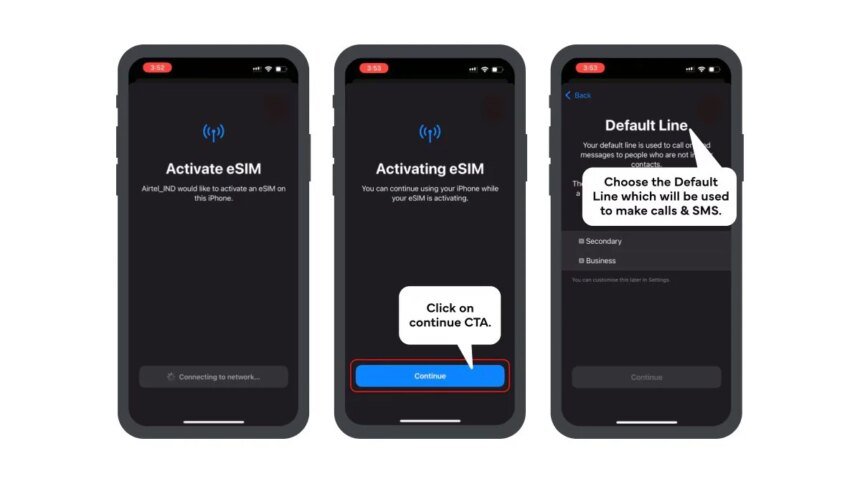
After submitting the eSIM request, you will receive a verification call from Airtel. Confirm your request during the call to complete your request. The Airtel eSIM request will be ready for setup soon, and users can download the eSIM on their smartphone. The eSIM will get activated within 2 hours after profile download. After switching from a physical SIM to an eSIM, activate the new eSIM profile, remove the physical SIM and restart your device

After activation, users have to keep the EID private to avoid unauthorised access. If an Airtel eSIM-enabled device is lost, customers can visit the nearest Airtel Store for support.

FAQs

1. What is an eSIM?

eSIM is a digital SIM that is embedded into compatible smartphones.

2. Which phones are compatible with Airtel eSIM?

Apple’s iPhone, Google’s Pixel smartphones, Samsung, Motorola and Vivo devices are compatible with the Airtel eSIM card.

3. Do I need to visit an Airtel Store to activate an eSIM?

No, users can request and activate an Airtel eSIM through the Airtel App.

Get your daily dose of tech news, reviews, and insights, in under 80 characters on Gadgets 360 Turbo. Connect with fellow tech lovers on our Forum. Follow us on X, Facebook, WhatsApp, Threads and Google News for instant updates. Catch all the action on our YouTube channel.



Apple Rolls Out iOS 27 Public Beta 2 Update for Eligible iPhone Models: See What’s New


Source link

Share This Article
Twitter Email Copy Link Print
What do you think?
Love0
Sad0
Happy0
Sleepy0
Angry0
Dead0
Wink0
Previous Article Donald Trump returns to White House Correspondents’ dinner months after shooting forced postponement – Delhi News Daily
Leave a comment

Leave a Reply Cancel reply

Your email address will not be published. Required fields are marked *

Recent Posts

  • How to Activate Your Airtel eSIM in 2026: A Step-by-Step Guide – Delhi News Daily
  • Donald Trump returns to White House Correspondents’ dinner months after shooting forced postponement – Delhi News Daily
  • US stocks today: Nasdaq lags on angst over AI spending ahead of earnings reports – Delhi News Daily
  • Dhakke – Official Teaser – Delhi News Daily
  • Sunil Joshi reveals India’s bowling strategy before 2nd T20I – Delhi News Daily

Recent Comments

No comments to show.

You Might Also Like

WhatsApp Introduces Incognito Chat With Meta AI for Private Conversations
Technology

WhatsApp Introduces Incognito Chat With Meta AI for Private Conversations – Delhi News Daily

WhatsApp has announced Incognito Chat with Meta AI, a new feature that lets users have private, temporary conversations with the…

3 Min Read
Honor Earbuds 4 Launched Globally With Active Noise Cancellation, Up to 46 Hours of Total Battery Life
Technology

Honor Earbuds 4 With Up to 46 Hours of Total Battery Life Debut Globally – Delhi News Daily

Honor Earbuds 4 have expanded to select global markets after first launching in China in October 2025. The true wireless…

3 Min Read
Vivo Y500s Launched With 7,200mAh Battery, 50-Megapixel Main Camera: Price, Spcifications
Technology

Vivo Y500s Launched With 7,200mAh Battery, 50-Megapixel Main Camera – Delhi News Daily

Vivo Y500s recently launched in China, joining the Chinese smartphone maker's expanding budget 5G lineup. The handset features a 7,200mAh…

3 Min Read
New Study Suggests Uranus and Neptune May Contain More Rock Than Ice
Technology

New Study Suggests Uranus and Neptune May Contain More Rock Than Ice – Delhi News Daily

In the past, Uranus and Neptune have been classified as "ice giants," the solar system's two most distant planets, which…

2 Min Read

Delhi News Daily

© Delhi News Daily Network.

Incognito Web Technologies

Welcome Back!

Sign in to your account

Username or Email Address
Password

Lost your password?